
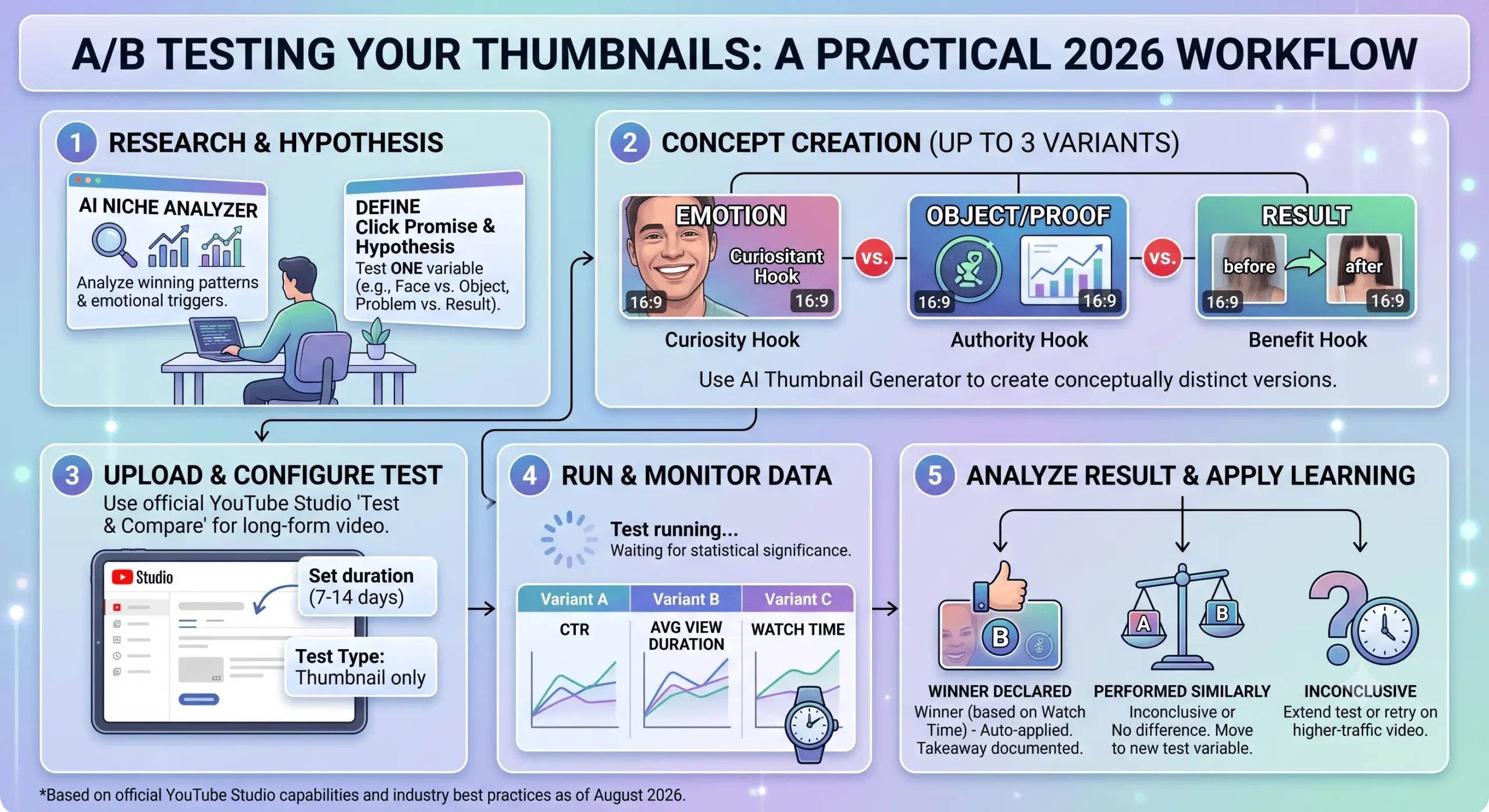
A/B Testing Your Thumbnails: A Practical Workflow for 2026
You can spend hours analyzing analytics and studying color theory, but at the end of the day, audience behavior is unpredictable. What you think is a brilliant thumbnail design might flop, while a simple, unpolished image could go viral. This is why guessing is no longer a viable growth strategy. In 2026, the most successful creators rely on data-driven decisions through a process called A/B testing.
A/B testing (or split testing) involves showing two or more variations of a thumbnail to different segments of your audience to see which one generates a higher Click-Through Rate (CTR) and longer Average View Duration (AVD). Here is your practical, step-by-step workflow for running successful thumbnail tests.
Step 1: Create Distinct Variations
The biggest mistake creators make during A/B testing is making the variations too similar. Changing the font color from yellow to green won’t yield statistically significant results. You need to test entirely different concepts.
- Test A (The Subject Focus): Focus heavily on a human face showing extreme emotion.
- Test B (The Text/Object Focus): Use a faceless design with massive typography and a high-contrast object.
- Test C (The Minimalist): Remove almost all context and use a highly intriguing, zoomed-in image.
If you need inspiration on crafting these distinct visual hooks, we highly recommend reading our comprehensive guide on how to design a thumbnail that gets clicks. It breaks down the exact psychological triggers you should be testing against each other.
Step 2: Ensure Technical Perfection
A valid A/B test requires an equal playing field. If Variation A is crystal clear but Variation B is compressed or gets its text cut off by the YouTube timestamp, your test results will be skewed. A bad crop will ruin a good design’s CTR.
Before uploading your variations, you must ensure that all test images strictly adhere to the optimal YouTube thumbnail sizes (1280×720 pixels) and respect the mobile safe zones. Consistency in technical formatting is the only way to ensure you are testing the design, not the resolution.
Step 3: Using YouTube’s “Test & Compare” Tool
In the past, creators had to use third-party paid tools to swap thumbnails back and forth every 24 hours. Today, YouTube offers a native Test & Compare feature built directly into YouTube Studio. Here is how to use it:
- Go to YouTube Studio and upload your new video.
- In the Thumbnail section, select the Test & Compare option.
- Upload up to three different thumbnail variations.
- Publish your video.
Once published, YouTube’s algorithm will evenly distribute these thumbnails to your viewers. The system will track which image gets the most clicks and, importantly, which one retains viewers the longest.
Step 4: Analyzing the Results and the SEO Impact
Testing usually takes a few days to a couple of weeks to gather enough data, depending on your channel’s traffic volume. YouTube will eventually declare a “Winner” based on Watch Time share.
Why does YouTube care about Watch Time instead of just CTR? Because clickbait ruins the platform. As we discussed in our detailed breakdown of YouTube thumbnail SEO, the algorithm ranks videos that deliver on the promise made by the thumbnail. If Variation A gets a 10% CTR but people leave after 10 seconds, and Variation B gets an 8% CTR but people watch for 5 minutes, Variation B will win the A/B test and push your video higher in the search rankings.
The Continuous Workflow
A/B testing is not a one-time event; it is a continuous loop. Once a winning thumbnail is declared, you should analyze why it won. Did the audience prefer the red background? Did the shorter text work better? Use these insights to inform the baseline design of your next video, and then start the testing process all over again.
Frequently Asked Questions
How long does a YouTube thumbnail A/B test take?
The duration depends on your channel’s daily viewership. For channels with high traffic, YouTube’s Test & Compare tool might declare a winner in 48 hours. For smaller channels, it can take up to 14 days to gather statistically significant data.
Should I A/B test old videos?
Absolutely. A/B testing older, evergreen videos is a fantastic way to revive dead content. By testing a modernized, high-contrast thumbnail on a video from two years ago, you can often trigger the algorithm to start promoting it again.
Can I run an A/B test without YouTube’s native tool?
Yes. If you don’t have access to the native tool, you can do a manual test by changing the thumbnail every 24 hours at the same time of day for a week, and then manually comparing the daily CTR metrics in your YouTube Studio analytics.